4th of July Sale: 10% OFF on all KrishaStore Products. Code: INDEPENDENCE10. Limited time.

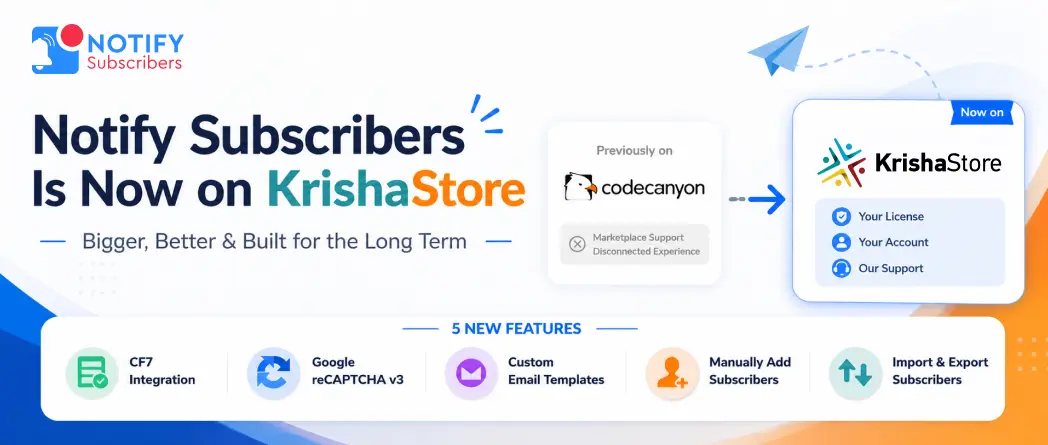
If you have used Notify Subscribers before, you know the core of what it does. You publish a post. Your subscribers get an email. No newsletter to draft. No extra steps between hitting publish and reaching your audience. It just works.
We have been listening to how people use it and what they keep asking for. Five major features came up repeatedly. We built all five. And we are launching the updated Pro version here on KrishaStore today, alongside a full set of capabilities that make this a genuinely complete subscriber notification system for WordPress.
Notify Subscribers was previously listed on CodeCanyon. We are moving it to KrishaStore as part of a gradual transition across our entire plugin catalog. One plugin at a time, done properly.
This is a good thing for you.
On KrishaStore, your license is tied directly to your account. You can see your license key, renewal date, and subscription options in your dashboard whenever you need them. Support requests come straight to the KrishaWeb team. The developers who built the plugin are the ones helping you with it.
If you purchased Notify Subscribers on CodeCanyon, your support does not stop. Our team is still here. Reach us at [email protected] or contact us, and we will sort out anything you need. You are not left behind.
The most requested feature. Drop a single shortcode into any Contact Form 7 form and you get a subscriber opt-in checkbox. When someone submits the form with the box ticked, they are added to your list automatically. No separate subscription form. If you are already using CF7 for contact or inquiry forms, your visitors can subscribe right there.
Bot submissions were slipping into subscriber lists and quietly hurting deliverability. reCAPTCHA v3 runs in the background, scoring each attempt without asking real visitors to solve anything. Bots get blocked. Real subscribers go through with zero friction. Turn it on from the settings with your site key.
Beyond post notifications, you can send standalone promotional emails to your subscriber list. New product launch, a seasonal discount, and an important company announcement. Build the email using the template editor, and adjust the subject line, header, colors, layout, and footer so it looks like it came from your brand, not from a plugin. Set up different templates for different types of sends. Before anything goes out, fire off a test email to yourself to make sure it looks right.
Not every subscriber comes through a form. If you have existing customers, clients, or contacts who have agreed to receive your updates, add them directly from the WordPress admin. Add one at a time. Each new subscriber receives a notification email confirming they have been added.
Import an existing list from a CSV file in one step. The plugin adds valid entries without sending notification emails to imported subscribers, so you do not flood inboxes when bringing over a list from another source. Export your full subscriber list to CSV or PDF whenever you need it for reporting, backup, or running a campaign in another tool.
The five new features above are the headline additions. Here is the full picture of what the plugin does.
Automatic new post email notifications: Publish a blog post, a page, or any custom post type, and the plugin sends a notification to every active subscriber automatically. No manual effort. Your audience stays informed the moment new content goes live.
Built-in subscription system: A clean subscription form visitors can use to sign up directly on your site. No third-party service needed. Just WordPress and this plugin.
Customizable subscriber form: Control how the subscription form looks on your site. Style it to match your design. Place it on any page, post, or sidebar using widgets, shortcodes, or Gutenberg blocks.
Widget, shortcode, and Gutenberg support: Display the subscription form anywhere. Gutenberg blocks for the block editor. Shortcodes for classic layouts. Widgets for sidebars and footers. All three work across pages, posts, and custom layouts.
Easy subscriber management: View and manage every subscriber from your WordPress dashboard. Track subscriber details, subscription dates, and status without leaving the admin or using a separate tool.
Subscriber dashboard: See your numbers at a glance: total subscribers, unsubscribes, post notification count, and recent subscriber activity. All from one screen.
Customizable notification email templates: Personalize your notification emails with dynamic placeholders: post title, post excerpt, website name, post URL, and more. Match your brand voice and style without touching code.
Subscriber unsubscribe management: Every notification email includes an unsubscribe link. Subscribers can opt out at any time with one click. The plugin keeps your list clean and compliant automatically.
Admin notifications for new subscribers: Get an instant email whenever someone new subscribes to your site. Know who is joining your audience in real time without checking the dashboard.
Mailchimp integration: Connect your Mailchimp account using your API key and list ID. New website subscribers sync to your Mailchimp audience automatically. Use both systems together or Mailchimp as a backup for your on-site list.
Multi-language support: The plugin supports multiple languages and works on multilingual and international WordPress installations.
Test email for every template: Before any notification or promotional email goes to subscribers, send a test email to yourself. Check the layout, the placeholders, and the content. Make sure it looks right before it reaches anyone.
We built KrishaStore to own the full experience for our plugin customers. Better license management, more flexible plans, direct support, and the ability to ship updates on our own schedule.
KrishaWeb has been building WordPress tools since 2008. We are not going anywhere. Moving our plugins to KrishaStore is us investing in the long-term relationship with the people who use them. That includes you.
| Plan | Price | What Is Included |
| Yearly | $29 per year | Updates, new features as they ship, and priority support for twelve months, renewable annually. |
| Lifetime | $79 one-time | Access to the current feature set and bug fixes with no renewals. New features added after purchase are not included in the lifetime plan. If a major feature release interests you, you can upgrade at that point. |
Both plans include every feature listed above. No add-ons. No features locked behind a higher tier. Everything in the plugin is available on every plan.
Questions about the move from CodeCanyon, an existing purchase, or anything else? Email [email protected] or Contact Us, and our team will respond directly.


 WordPress Plugins


